NoteLoom-AI Notetaker

NoteLoom is an AI-supported study platform designed to help college students manage cognitive overload caused by fragmented study tools and fast-paced lectures. Over 10 weeks, my team and I researched, designed, and tested a solution that centralizes note-taking, summarization, and active recall. Through three rounds of iterative testing, we improved the System Usability Scale (SUS) score from 78.5 to 97.5, creating a tool that balances AI automation with human agency.
Role

Role

UX Researcher & Designer

UX Researcher & Designer

UX Researcher & Designer

Industry

Industry

Education

Education

Team Size

Team Size

6 members

6 members

Timeline

Timeline

Oct 2025 - Dec 2025

Oct 2025 - Dec 2025

Problem Statement

College students today navigate a chaotic ecosystem of handwritten notes, PDF slides, and various AI tools. This fragmentation leads to high cognitive load and reduced learning efficiency.

Tool Overload

Tool Overload

Students juggle screenshots, slides, and separate AI tools (like ChatGPT), leading to scattered information.

Organization Debt

Organization Debt

Students lose significant time manually reorganizing material before they can even begin studying.

Speed v/s Structure

Speed v/s Structure

During fast-paced lectures, prioritizing capturing words over understanding, often resulting in messy, unusable notes.

UX Road Map

Our roadmap was divided into a three-phase User-Centered Design (UCD) process:

Aug-Sep

Empathize Phase

Aug-Sep

Empathize Phase

Oct-Nov

Ideation & Prototype Phase

Oct-Nov

Ideation & Prototype Phase

Nov-Dec

Testing Phase

Emphatize Phase

In this phase our focus was on gathering insights through 1-on-1 user interview, by observing students' note-taking behavior, and by referring research articles that focus on AI trust, cognitive load, and multimodal learning in students.


Primary Research Question:

Primary Research Question:

  • How can an AI-supported study platform reduce cognitive load for college students while maintaining transparency and user control?

  • How can an AI-supported study platform reduce cognitive load for college students while maintaining transparency and user control?

  • How can an AI-supported study platform reduce cognitive load for college students while maintaining transparency and user control?

Sub Questions:

Sub Questions:

  • How can AI automation support learning without replacing active engagement?


  • What interface structures minimize organizational friction?


  • How can transparency mechanisms increase trust in AI-generated outputs?


  • How do affordance clarity and feature visibility affect usability under cognitive load?


  • How can AI automation support learning without replacing active engagement?


  • What interface structures minimize organizational friction?


  • How can transparency mechanisms increase trust in AI-generated outputs?


  • How do affordance clarity and feature visibility affect usability under cognitive load?


  • How can AI automation support learning without replacing active engagement?


  • What interface structures minimize organizational friction?


  • How can transparency mechanisms increase trust in AI-generated outputs?


  • How do affordance clarity and feature visibility affect usability under cognitive load?


Secondary Research

Secondary Research

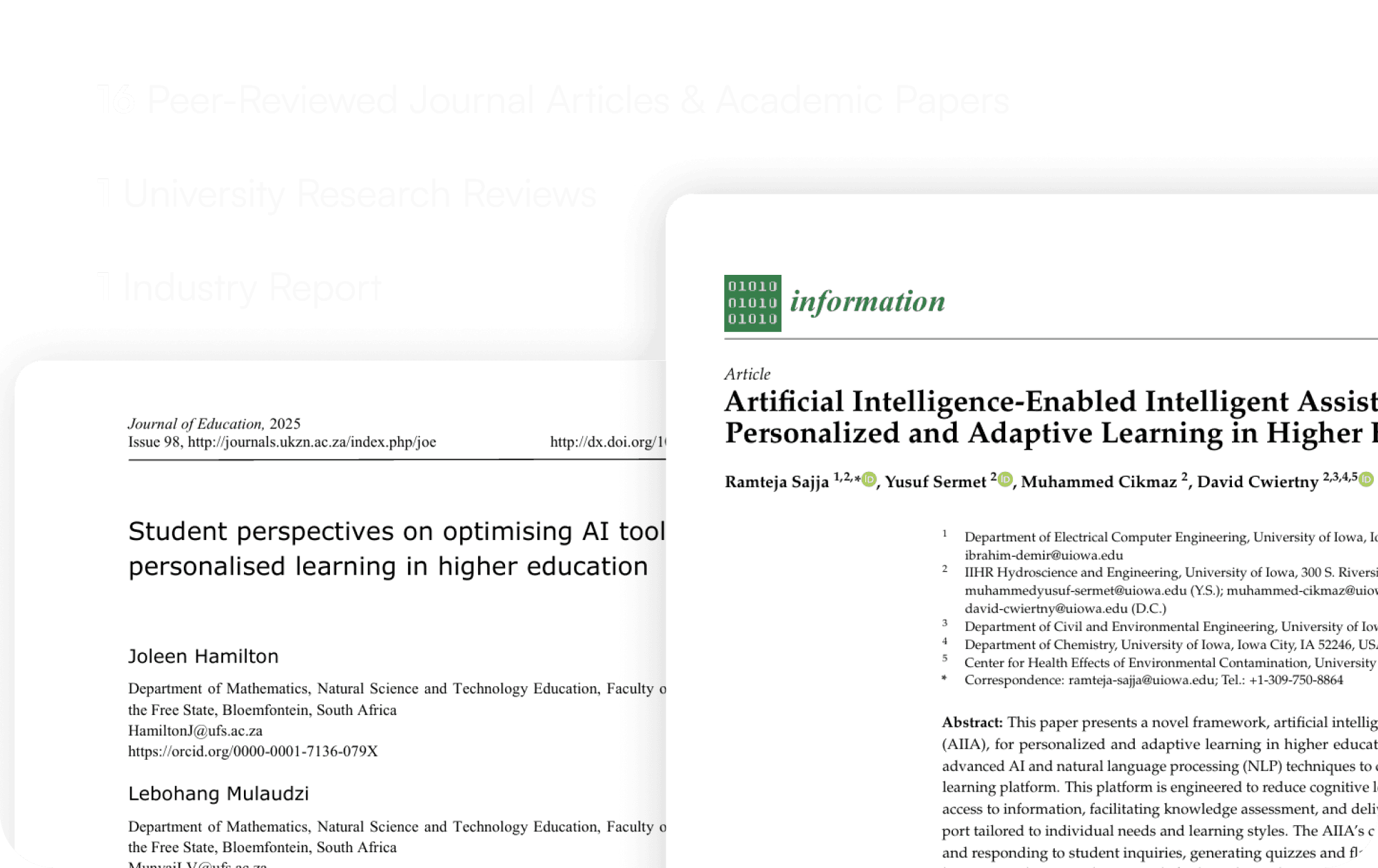
A total of 18 articles were reviewed on topics of cognitive load, multimodal learning, and AI trust in students in higher studies and found 4 key insights.

A total of 18 articles were reviewed on topics of cognitive load, multimodal learning, and AI trust in students in higher studies and found 4 key insights.

A total of 18 articles were reviewed on topics of cognitive load, multimodal learning, and AI trust in students in higher studies and found 4 key insights.

01

Multimodal Learning Accelerates Retention:

We discovered that relying purely on massive blocks of text is an inefficient way to study. Our design needed to bridge the gap between text and visual representations.

02

02

"Explainable" and Controllable AI:

A major insight was that students are skeptical of "black-box" AI tools. To build trust, NoteLoom had to be a transparent partner, not a Magic 8-Ball.

03

03

Active Engagement vs. Digital Distraction

While digital tools are necessary, they often become a source of distraction. We needed to design an environment that kept students actively engaged.

04

04

Cognitive Load Optimization:

Cognitive overload and disorganized study habits directly contribute to student burnout. NoteLoom needed to act as an organizational anchor.

1-on-1 User Interview

1-on-1 User Interview

A total of 7 students aged 18-35 were interviewed to understand student behavior.

A total of 7 students aged 18-35 were interviewed to understand student behavior.

A total of 7 students aged 18-35 were interviewed to understand student behavior.

01

01

Efficiency & Overload

The cognitive cost of reorganizing notes across multiple apps frequently exceeds the perceived learning benefit.

02

02

The Speed vs. Comprehension Deficit

During fast-paced lectures, students abandon structured note-taking completely just to keep up, capturing fragmented text that lacks context when reviewed later.

03

03

Trust & Transparency

While students are eager for AI to save them time, they are highly skeptical of automated academic assistance that doesn't show its work.

04

04

Stress Levels

Messy, unstructured materials scattered across PDFs, screenshots, and word documents directly trigger anxiety.

Affinity Diagram
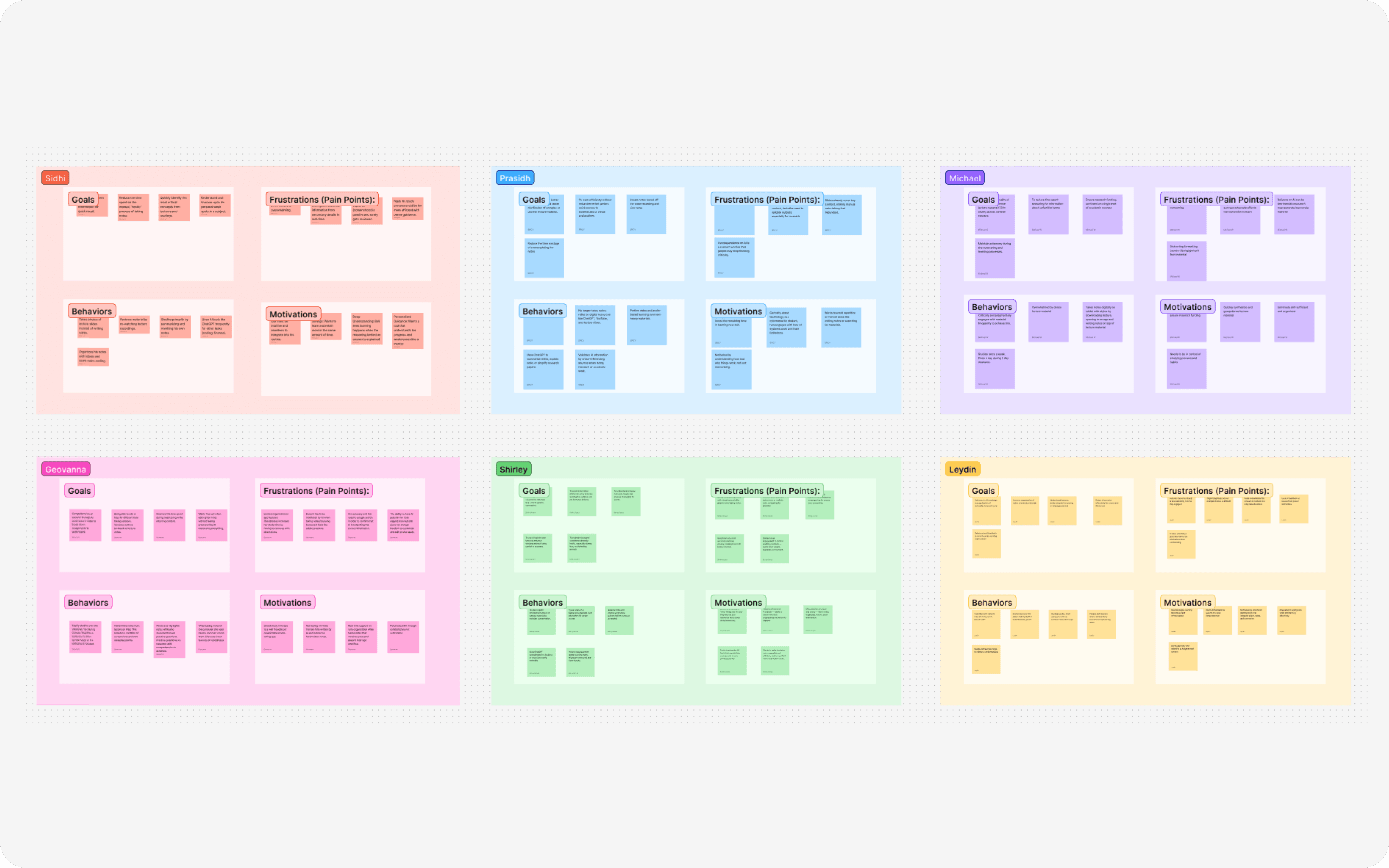
Based on the insights we gathered from the interviews, we divided them into 4 categories: Goals, Motivations, Need and Pain Points

Based on the insights we gathered from the interviews, we divided them into 4 categories: Goals, Motivations, Need and Pain Points

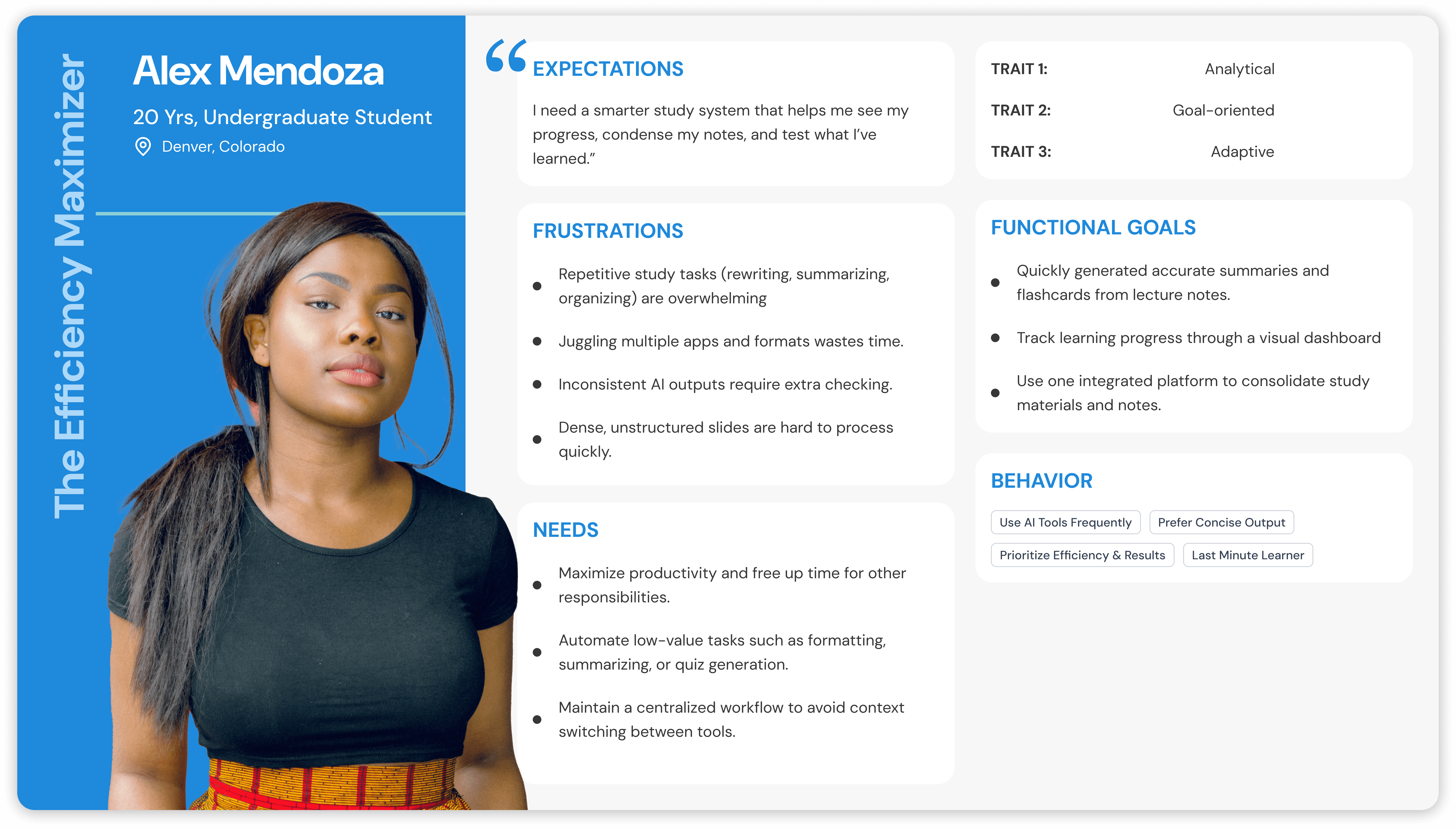
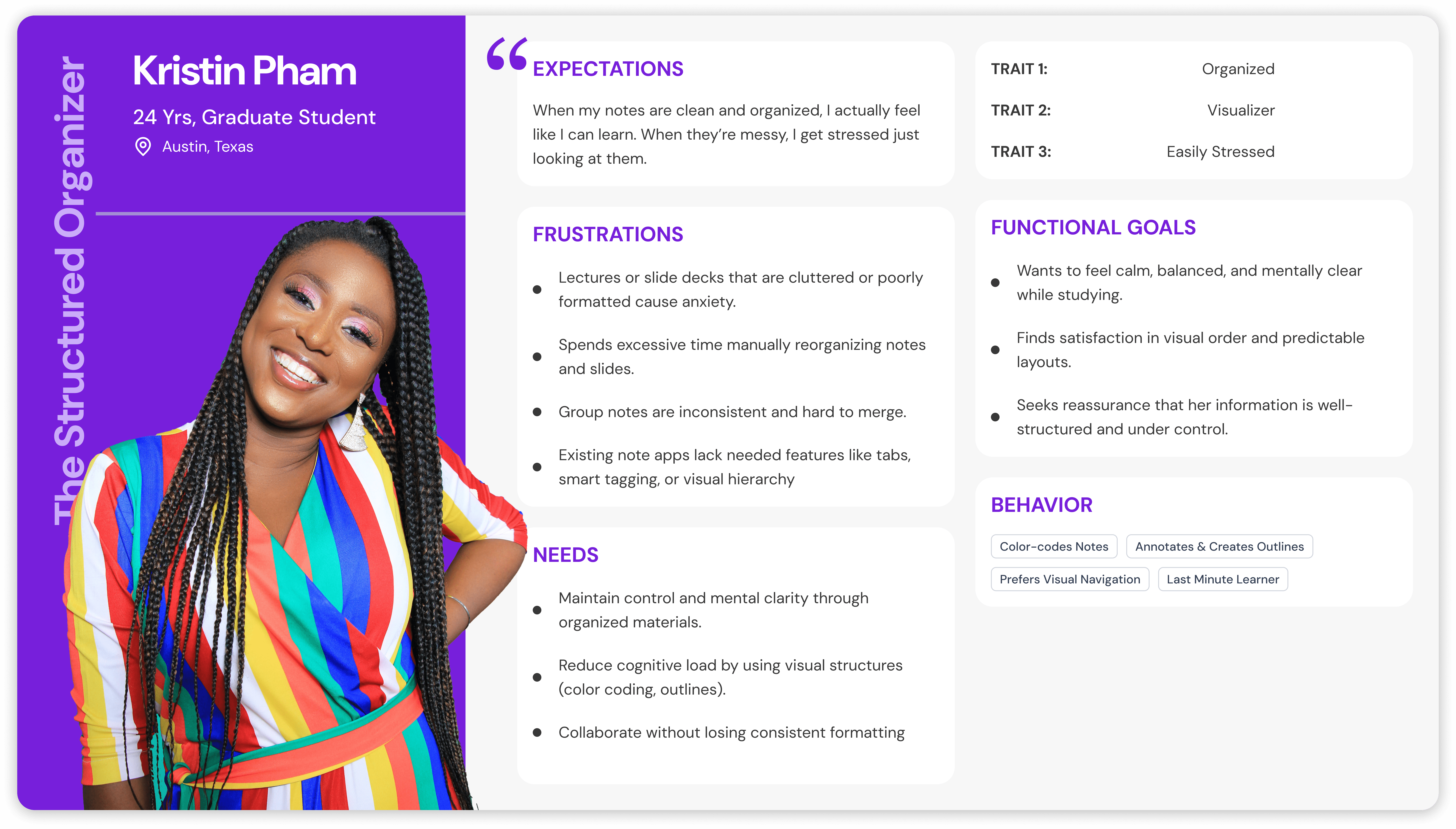
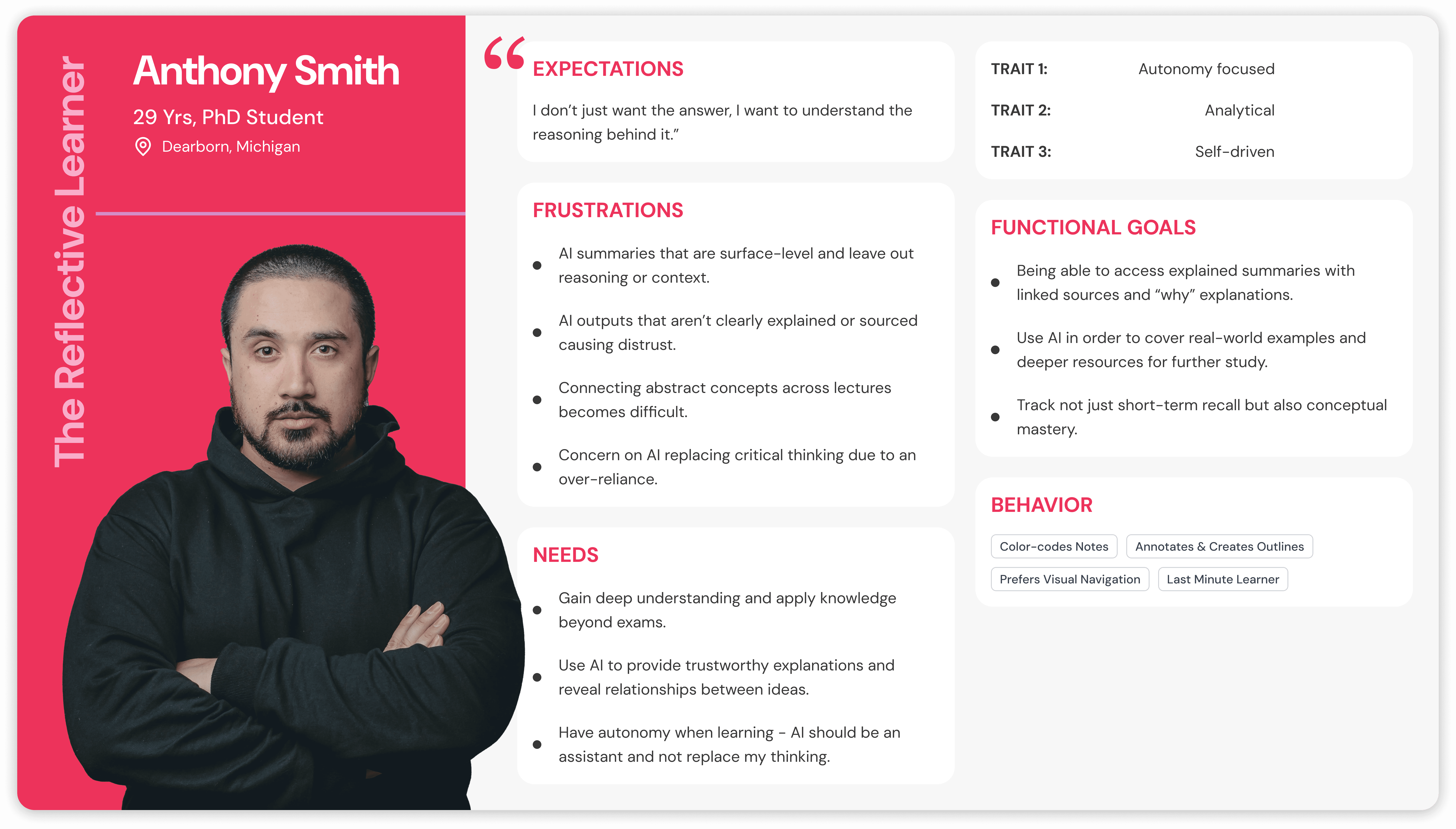
User Persona

We synthesized our research into three personas to guide our 3 Core feature pillars: Automation, Organization, & Transparency

We synthesized our research into three personas to guide our 3 Core feature pillars: Automation, Organization, & Transparency

Ideation Phase

In this phase we used the Crazy 8s method (sketching 8 ideas in 8 minutes) to generate low-fidelity concepts addressing the 'How Might We Statements' to satisfy the user needs. We also experimented with "AI Sketching" to expand our divergent thinking, though we found human refinement necessary to add empathy.

In this phase we used the Crazy 8s method (sketching 8 ideas in 8 minutes) to generate low-fidelity concepts addressing the 'How Might We Statements' to satisfy the user needs. We also experimented with "AI Sketching" to expand our divergent thinking, though we found human refinement necessary to add empathy.

Emerging Key Points

Emerging Key Points

Derived through affinity mapping data, we found key points based on three thematic pillars: Efficiency, Structure, and Deep Understanding, which helped us transform individual observations into a strategic foundation for our design requirements.

Derived through affinity mapping data, we found key points based on three thematic pillars: Efficiency, Structure, and Deep Understanding, which helped us transform individual observations into a strategic foundation for our design requirements.

Lost time reorganizing scattered material vs learning.

Lost time reorganizing scattered material vs learning.

Visual learners depending on clear structure and hierarchy.

Visual learners depending on clear structure and hierarchy.

Reasoning & sources = Trust in AI.

Reasoning & sources = Trust in AI.

Dictated study flow v.s. Guided adaptive support

Dictated study flow v.s. Guided adaptive support

Reducing Effort without sacrificing comprehension.

Reducing Effort without sacrificing comprehension.

How Might We (HMW) Statements

How Might We (HMW) Statements

We derived these statements by inverting our "Key Points" into generative questions, ensuring that every proposed feature remained a direct and purposeful response to a validated user need.

We derived these statements by inverting our "Key Points" into generative questions, ensuring that every proposed feature remained a direct and purposeful response to a validated user need.

How might we help students stay visually organized across study material?

How might we help students stay visually organized across study material?

How might we create adaptive learning experience that suits multiple learning styles?

How might we create adaptive learning experience that suits multiple learning styles?

How might we design AI tools that explain reasoning transparently?

How might we design AI tools that explain reasoning transparently?

How might we promote collaboration while preserving personal study preferences?

How might we promote collaboration while preserving personal study preferences?

How might we reduce overload without diminishing comprehension?

How might we reduce overload without diminishing comprehension?

Crazy 8s Ideation & Voting

To rapidly ideate, we used Crazy 8s to sketch 48 concepts in eight minutes, grounded in specific user personas. By integrating AI-generated layouts, we balanced logical, human-centered workflows with divergent, unconventional patterns, leveraging AI for high-volume exploration and human empathy for strategic convergence.

To rapidly ideate, we used Crazy 8s to sketch 48 concepts in eight minutes, grounded in specific user personas. By integrating AI-generated layouts, we balanced logical, human-centered workflows with divergent, unconventional patterns, leveraging AI for high-volume exploration and human empathy for strategic convergence.

Low-fidelity Wireframes

We translated our rapid sketches into unique low-fidelity wireframes to establish a functional skeleton for the product. Low-fidelity wireframes were focused on defining the core architecture for note creation, AI-driven summaries, and flashcard generation. By prioritizing layout and logic over aesthetics, we ensured that the AI integration remained discoverable and the user flows remained centralized and efficient.

We translated our rapid sketches into unique low-fidelity wireframes to establish a functional skeleton for the product. Low-fidelity wireframes were focused on defining the core architecture for note creation, AI-driven summaries, and flashcard generation. By prioritizing layout and logic over aesthetics, we ensured that the AI integration remained discoverable and the user flows remained centralized and efficient.

Prototype & Testing Phase

In this phase, we developed mid-fidelity prototypes to establish a functional skeleton and conduct our first round of usability testing using a within-subject design, focusing on structural logic over aesthetics. Building on these insights, we transitioned into high-fidelity iterations for subsequent testing rounds, refining the visual hierarchy and human-AI collaboration to ensure the final interface was both intuitive and trustworthy.

In this phase, we developed mid-fidelity prototypes to establish a functional skeleton and conduct our first round of usability testing using a within-subject design, focusing on structural logic over aesthetics. Building on these insights, we transitioned into high-fidelity iterations for subsequent testing rounds, refining the visual hierarchy and human-AI collaboration to ensure the final interface was both intuitive and trustworthy.

In this phase, we developed mid-fidelity prototypes to establish a functional skeleton and conduct our first round of usability testing using a within-subject design, focusing on structural logic over aesthetics. Building on these insights, we transitioned into high-fidelity iterations for subsequent testing rounds, refining the visual hierarchy and human-AI collaboration to ensure the final interface was both intuitive and trustworthy.

Round 1 Testing - Mid-Fidelity Prototype

Round 1 Testing - Mid-Fidelity Prototype

The first round of testing focused on validating the structural logic of the dashboard and core note-taking flow. The testing observation revealed two critical friction points:

The first round of testing focused on validating the structural logic of the dashboard and core note-taking flow. The testing observation revealed two critical friction points:

The first round of testing focused on validating the structural logic of the dashboard and core note-taking flow. The testing observation revealed two critical friction points:

1] Accessibility Issues: Users consistently struggled to title their notes because the input field lacked visual boundaries and mimicked static text.

1] Accessibility Issues: Users consistently struggled to title their notes because the input field lacked visual boundaries and mimicked static text.

1] Accessibility Issues: Users consistently struggled to title their notes because the input field lacked visual boundaries and mimicked static text.

2] Hidden AI Features: AI features were too hidden; high-value tools like auto-summaries and flashcards suffered from low discoverability because they were buried in nested menus.

2] Hidden AI Features: AI features were too hidden; high-value tools like auto-summaries and flashcards suffered from low discoverability because they were buried in nested menus.

78.5

78.5

78.5

SUS Score

SUS Score

5

5

5

Participants

Participants

95%

95%

95%

Task Completion Rate

Task Completion Rate

Round 2 Testing - High-Fidelity Prototype Version 1

Round 2 Testing - High-Fidelity Prototype Version 1

The second round of testing of the first high-fidelity prototype confirmed that the introduction of color improved the visual appeal and that streamlining the note-creation flow was successful. However, three critical friction points emerged:

The second round of testing of the first high-fidelity prototype confirmed that the introduction of color improved the visual appeal and that streamlining the note-creation flow was successful. However, three critical friction points emerged:

The second round of testing of the first high-fidelity prototype confirmed that the introduction of color improved the visual appeal and that streamlining the note-creation flow was successful. However, it also has three critical friction points emerged:

1] Weak Affordance: Users struggled to understand how to interact with and edit flashcards and AI summaries.

1] Weak Affordance: Users struggled to understand how to interact with and edit flashcards and AI summaries.

1] Weak Affordance: Users struggled to understand how to interact with and edit flashcards and AI summaries.

2] Visual Hierarchy: The title section after adding the 'Title' in the note lacked a distinguishing element, reducing its discoverability.

2] Visual Hierarchy: The title section after adding the 'Title' in the note lacked a distinguishing element, reducing its discoverability.

2] Visual Hierarchy: The title section after adding the 'Title' in the note lacked a distinguishing element, reducing its discoverability.

3] Feature Flexibility: Users wanted more control, specifically the ability to view flashcards in multiple formats and directly edit AI-generated summaries.

3] Feature Flexibility: Users wanted more control, specifically the ability to view flashcards in multiple formats and directly edit AI-generated summaries.

3] Feature Flexibility: Users wanted more control, specifically the ability to view flashcards in multiple formats and directly edit AI-generated summaries.

85.5

85.5

85.5

SUS Score

SUS Score

5

5

5

Participants

Participants

100%

100%

100%

Task Completion Rate

Task Completion Rate

Round 3 Testing - High-Fidelity Prototype Version 2

Round 3 Testing - High-Fidelity Prototype Version 2

The third and final round of testing served to validate the refined interaction models and affordances implemented after Round 2. The results overwhelmingly proved the success of the iterative process. The testing observation revealed the following points:

The third and final round of testing served to validate the refined interaction models and affordances implemented after Round 2. The results overwhelmingly proved the success of the iterative process. The testing observation revealed the following points:

The third and final round of testing served to validate the refined interaction models and affordances implemented after Round 2. The results overwhelmingly proved the success of the iterative process. The testing observation revealed the following points:

Resolved Friction Points:

Resolved Friction Points:

1] Accessibility Issues: Users consistently struggled to title their notes because the input field lacked visual boundaries and mimicked static text.

1] Clear Affordances: The addition of explicit hint text completely resolved previous confusion around the note title field.

1] Clear Affordances: The addition of explicit hint text completely resolved previous confusion around the note title field.

1] Accessibility Issues: Users consistently struggled to title their notes because the input field lacked visual boundaries and mimicked static text.

2] Surfaced AI: Summaries and flashcards were no longer hidden, resulting in effortless discoverability.

2] Surfaced AI: Summaries and flashcards were no longer hidden, resulting in effortless discoverability.

1] Accessibility Issues: Users consistently struggled to title their notes because the input field lacked visual boundaries and mimicked static text.

97.5

97.5

97.5

SUS Score

SUS Score

5

5

5

Participants

Participants

100%

100%

100%

Task Completion Rate

Task Completion Rate

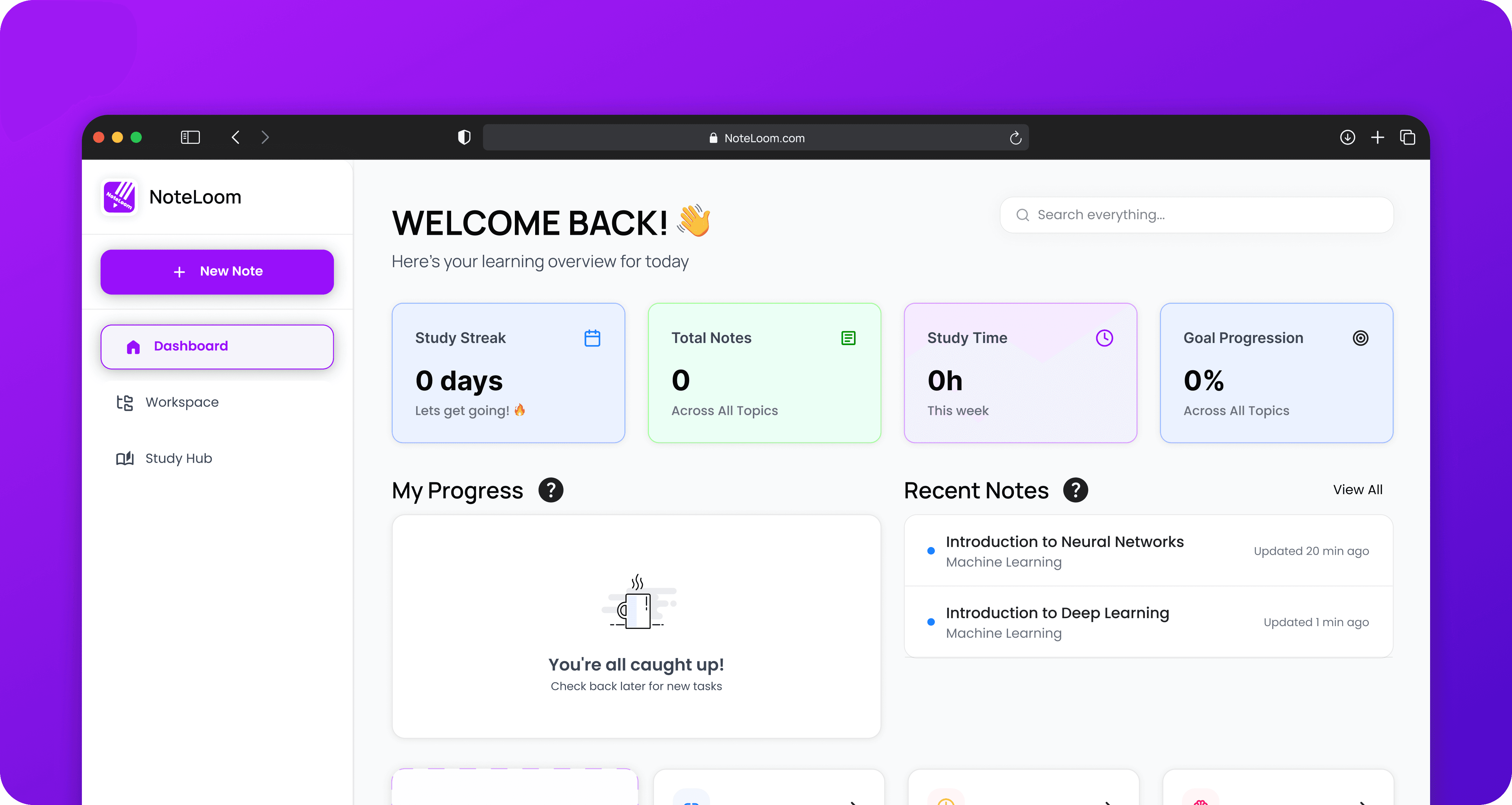
High Fidelity Prototype

This video shows the finalized high-fidelity prototype with incorporated feedback from all the usability testing.

This video shows the finalized high-fidelity prototype with incorporated feedback from all the usability testing.

Key Findings

Key Findings

01

Explicit Affordances are Non-Negotiable::

Explicit affordances are non-negotiable::

Explicit Affordances are Non-Negotiable::

Subtle design cues completely failed with our fast-paced user group. We learned that clear, visible boundaries and explicit text nudges are required to drive engagement and prevent task abandonment.

Subtle design cues completely failed with our fast-paced user group. We learned that clear, visible boundaries and explicit text nudges are required to drive engagement and prevent task abandonment.

02

02

Visibility Drives
Adoption:

Visibility Drives
Adoption:

Users overwhelmingly relied on features available at the top-level interface and actively avoided nested menus or ambiguous buttons. Surfacing high-value AI actions directly next to the editor instantly removed friction

Users overwhelmingly relied on features available at the top-level interface and actively avoided nested menus or ambiguous buttons. Surfacing high-value AI actions directly next to the editor instantly removed friction

03

03

The Automation vs. Control Tension:

The Automation vs. Control Tension:

While digital tools are necessary, they often become a source of distraction. We needed to design an environment that kept students actively engaged.

While digital tools are necessary, they often become a source of distraction. We needed to design an environment that kept students actively engaged.

AI Use in the Project

AI Use in the Project

AI Use in the Project

To accelerate the workflow and expand the conceptual landscape, several AI tools were strategically integrated throughout the project lifecycle.

To accelerate the workflow and expand the conceptual landscape, several AI tools were strategically integrated throughout the project lifecycle.

To accelerate the workflow and expand the conceptual landscape, several AI tools were strategically integrated throughout the project lifecycle.

Usage

Usage

• Crazy 8s idea generation

• Feature comparison

• UI flow visualization

AI-Teaming

"AI sped up layout ideas… but lacked empathy.”

“It sparked ideas, not decisions.”

Key Takeaway

Key Takeaway

  • AI = divergent thinking (quantity)

• Humans = convergent decisions (quality)

• Empathy > automation

Conclusion

Conclusion

Through three rounds of iterative, human-centered design, NoteLoom evolved from a concept into an intuitive, cognitively supportive study platform. By actively listening to user friction and responding with explicit interaction cues and surfaced navigation, NoteLoom transforms a highly fragmented study process into a centralized, efficient workflow.


Ultimately, NoteLoom succeeds because it strikes a delicate balance, utilizing AI to reduce busywork while preserving the transparency and user agency required for true academic comprehension. The success of this approach is reflected in the usability test metrics, jumping from a baseline usability score to a final SUS score of 97.5. NoteLoom demonstrates the immense potential of future-facing, AI-supported tools when they are strictly anchored to diverse human learning styles.

Through three rounds of iterative, human-centered design, NoteLoom evolved from a concept into an intuitive, cognitively supportive study platform. By actively listening to user friction and responding with explicit interaction cues and surfaced navigation, NoteLoom transforms a highly fragmented study process into a centralized, efficient workflow.


Ultimately, NoteLoom succeeds because it strikes a delicate balance, utilizing AI to reduce busywork while preserving the transparency and user agency required for true academic comprehension. The success of this approach is reflected in the usability test metrics, jumping from a baseline usability score to a final SUS score of 97.5. NoteLoom demonstrates the immense potential of future-facing, AI-supported tools when they are strictly anchored to diverse human learning styles.

Create a free website with Framer, the website builder loved by startups, designers and agencies.